| Field | Purpose |
|---|---|
| id | Immutable Adfin identifier |
| invoiceNo | Unique invoice number |
| description | Short information is shown to the payer |
| totalAmount / taxAmount / dueAmount | Calculated aggregates for amount and tax |
| dueDate / issueDate | Key dates for distribution |
| status | DRAFT, UNPAID, SCHEDULED, SUBMITTED, OVERDUE, PAID, SETTLED, VOID |
| itemsTaxType | EXCLUSIVE, INCLUSIVE, or NONE defines how the line-item tax is applied |
| items[] | Line items with description, unitAmount, quantity, taxrate, etc. |
| paymentRequests[] | On-demand or partial collections linked to this invoice. Only applicable when using On-Demand invoices |
| externalData[] | Contains data related to accounting systems such as Xero or QuickBooks. |
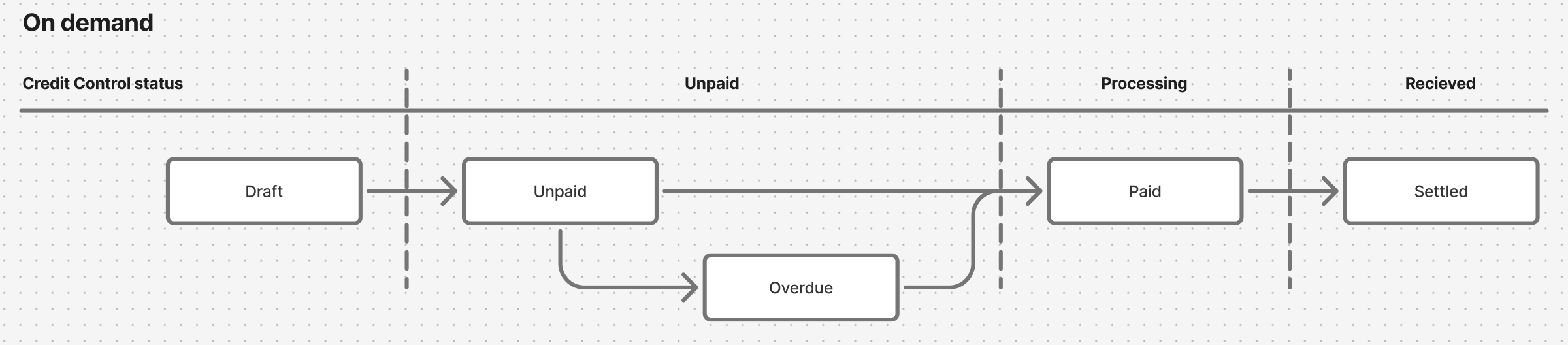
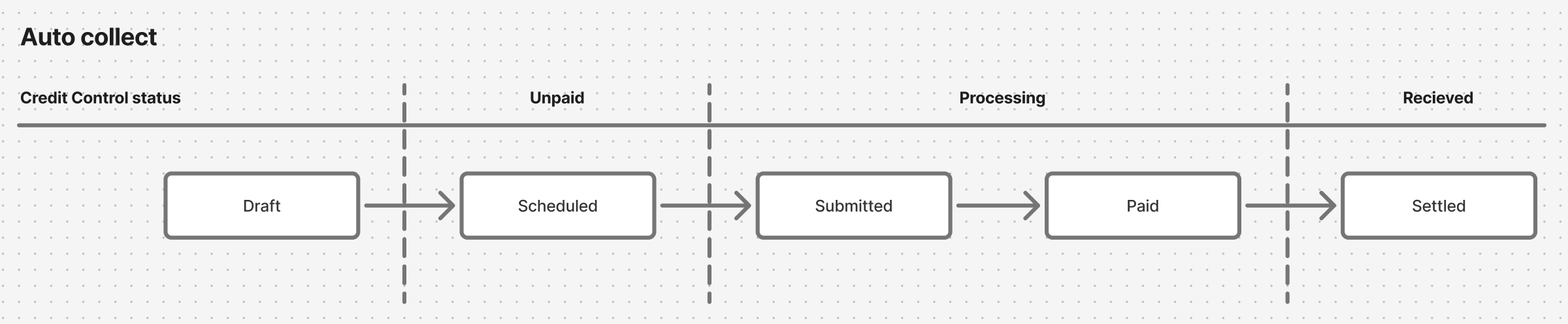
Invoices can be paid either using Adfin workflows, which instructs a corresponding payment status. This is represented by the invoice.status
These workflows are:
- On Demand (Card, Apple Pay, Google Pay, Pay by bank, bank transfer)
- Auto Collect (Direct debit)
Depending on the payment method, it will travel through different invoice.status path.
Start and end state:
- Invoices will always start in
DRAFT - Invoices will always end in
SETTLEDorVOIDorPAID
Rules of thumb
- Customer first, pass Adfin customer ID to create the invoice
- Invoice totals are calculated server-side; you only supply raw line-items.
- Duplicate invoice No is treated as idempotent and returns the existing record.
Endpoint: POST /invoices
Typical request:
{
  "customer": { "id": "123" },
  "items": [
    {
      "description": "Pro plan",
      "unitAmount": 4900,
      "quantity": 1
    }
    ],
  "dueDate": "2025-09-30"
}Endpoint: PUT /invoices/[id]:activate with an ActivateInvoiceRequest body
Move a DRAFT invoice to UNPAID (and optionally trigger Direct Debit) in one call:
{
  "collectionMethod": "DIRECT_DEBIT_PAYMENT",
  "customMessage": "Thanks for your business!"
}
• ONE_TIME_PAYMENT opens a hosted payment page (card / open banking). • DIRECT_DEBIT_PAYMENT queues automatic collection on the charge date. • The payer is emailed automatically using your chosen template.
| Action | Method & Path |
|---|---|
| Retrieve | GET /invoices/[id] |
| Update | PUT /invoices/[id] |
| Void (UNPAID, OVERDUE or SCHEDULED, or marked as paid by you; not if it has a credit note or a payment collected through Adfin) | PUT /invoices/[id]:void with a JSON body, e.g. {} |
| Mark as paid (offline or from your system) | PUT /invoices/[id]:mark-as-paid |
| Delete | Not part of the supported public API. To cancel an invoice, void it (statuses above). Draft invoices can't be voided |
Best-practice workflow
- Draft early – create invoices as soon as you know the amount; update until ready.
- Activate when final – sends notifications and triggers collection rules.
- Leverage Direct Debit – if the customer’s mandate is ACTIVE, Adfin auto-collects.
- Subscribe to webhooks to track OVERDUE, PAID, and SETTLED without polling.