| Field | Description |
|---|---|
| id | Immutable ID of the payment request |
| paymentRequestNo | Human-readable number |
| totalAmount / currencycode | Declare the total amount and currency (GBP only supported) |
| status | See the guide below on all payment request statuses. |
| workflowType | On demand (card) or Auto Collect |
| Distribution | How the payment link is used or completed |
| associationType | How are they related to invoices or payment requests |
| paymentLink.url | A hosted page where the payment can be completed |
| redirectUrl | Where to send the user after the user has completed the payment |
Payments requests follow a lifecycle that is represented in the status field of the object.
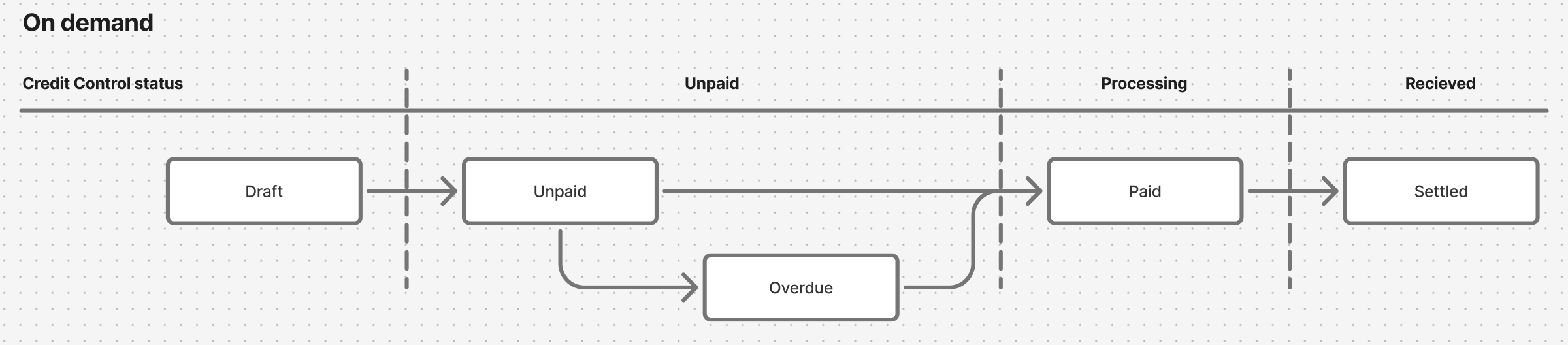
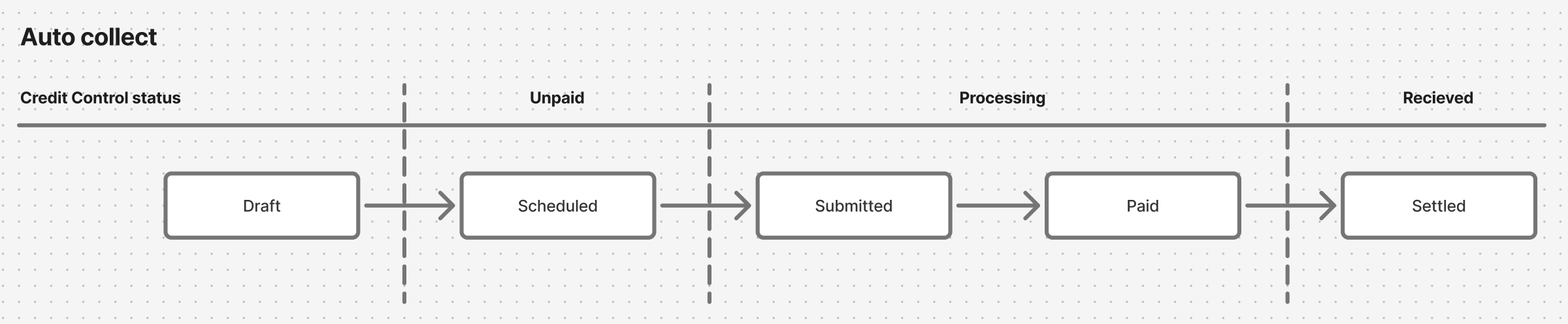
Payments that are activated as AUTO_COLLECT follow a linear state path. Auto collect is a abstraction that uses mandate payment methods to pull the payment from the customers account. In the UK this is direct debit.
Endpoint: POST /payment_requests
It will return the following important information (sample)
- ID of the payment request
- payment link to use with the user
{
  ...
  "customer": {
    "id": "f492b38c-0de1-4278-9bad-de5fb74961ca"
  },
  "currencyCode": "GBP",
  "distribution": { //Distribution can be specified directly in payment requests or the next step
  "collectionMethod": "ONE_TIME_PAYMENT",
  "customMessage": "Payment for ACME services",
  "templateId": "f2363d28-018a-40de-915d-c0f209b14159"
  },
  "description": "Payment for ACME service",
  "totalAmount": 100,
  "payByDate": "2025-03-25T11:36:55.243Z"
  ...
}Endpoint: PUT payment_requests/[id]:activate
Used to activate the payment request. This will trigger any workflows associated with this, including distribution (via email, WhatsApp, etc).
This will activate the workflow defined in the distribution.templateId
- Redirect the payer from your UI.
- Paste into email, chat, or a PDF.
- Always set a redirectUrl so the payer lands back in your platform after completing the payment.
- Display amount & description before redirecting—conversion rates improve when payers know the cost.
- Monitor lastSeenTime and trigger follow-up emails after 48 hours of inactivity.
- Subscribe to
payment-requestwebhook events. A status change arrives as aPAYMENT_REQUEST_UPDATEDevent that carries IDs only (includingpaymentRequestId), not the new status, so callGET /payment_requests/[id]and mark the invoice paid whenstatusisPAID(orSETTLED, if you handle the event after payout).